
精品推荐

    Warning: unserialize(): Error at offset 133 of 408 bytes in /www/wwwroot/comshuyang8/wp-content/themes/softsphere/functions.php on line 120
  • win7仿win8主题win7仿win8主题

  • Warning: unserialize(): Error at offset 133 of 250 bytes in /www/wwwroot/comshuyang8/wp-content/themes/softsphere/functions.php on line 120
  • 系统之家一键重装大师系统之家一键重装大师

  • Warning: unserialize(): Error at offset 11 of 128 bytes in /www/wwwroot/comshuyang8/wp-content/themes/softsphere/functions.php on line 120
  • 定时关机3000定时关机3000
  • 海贼王动漫win7主题海贼王动漫win7主题

  • Warning: unserialize(): Error at offset 133 of 250 bytes in /www/wwwroot/comshuyang8/wp-content/themes/softsphere/functions.php on line 120
  • 暴风win10激活工具暴风win10激活工具
  • 玉历宝钞玉历宝钞

  • Warning: unserialize(): Error at offset 11 of 128 bytes in /www/wwwroot/comshuyang8/wp-content/themes/softsphere/functions.php on line 120
  • 小马win7小马win7

  • Warning: unserialize(): Error at offset 11 of 128 bytes in /www/wwwroot/comshuyang8/wp-content/themes/softsphere/functions.php on line 120
  • 时间还原与文件归理时间还原与文件归理

  • Warning: unserialize(): Error at offset 133 of 372 bytes in /www/wwwroot/comshuyang8/wp-content/themes/softsphere/functions.php on line 120
  • RunAsDateRunAsDate

  • Warning: unserialize(): Error at offset 11 of 128 bytes in /www/wwwroot/comshuyang8/wp-content/themes/softsphere/functions.php on line 120
  • 任务栏修复工具任务栏修复工具

  • Warning: unserialize(): Error at offset 133 of 250 bytes in /www/wwwroot/comshuyang8/wp-content/themes/softsphere/functions.php on line 120
  • vmlitevmlite

  • Warning: unserialize(): Error at offset 11 of 128 bytes in /www/wwwroot/comshuyang8/wp-content/themes/softsphere/functions.php on line 120
  • 局域网监控系统局域网监控系统

  • Warning: unserialize(): Error at offset 133 of 372 bytes in /www/wwwroot/comshuyang8/wp-content/themes/softsphere/functions.php on line 120
  • Everything(文件快速搜索)Everything(文件快速搜索)

  • Warning: unserialize(): Error at offset 133 of 372 bytes in /www/wwwroot/comshuyang8/wp-content/themes/softsphere/functions.php on line 120
  • 装机吧一键重装系统装机吧一键重装系统

  • Warning: unserialize(): Error at offset 133 of 250 bytes in /www/wwwroot/comshuyang8/wp-content/themes/softsphere/functions.php on line 120
  • 百度云盘搜索(资源搜索引擎)百度云盘搜索(资源搜索引擎)
  • xp激活工具xp激活工具

  • Warning: unserialize(): Error at offset 133 of 494 bytes in /www/wwwroot/comshuyang8/wp-content/themes/softsphere/functions.php on line 120
  • EasyUEFIEasyUEFI

  • Warning: unserialize(): Error at offset 133 of 494 bytes in /www/wwwroot/comshuyang8/wp-content/themes/softsphere/functions.php on line 120
  • 黑鲨装机大师黑鲨装机大师

小马激活工具

小马激活工具
  • 更新时间:
  • 软件分类: 系统软件
  • 软件版本: V3.1
  • 软件大小: 848KB
  • 软件平台: Windows
  • 软件评分: 4.0分

小马激活工具软件介绍

小马激活工具免费版是一款免费激活Win7/8/10的工具系统,实现永久完美离线激活,完全超越其他任何激活工具。用户在安装完Windows操作系统后,只需要打开小马激活工具免费版,点击“永久体验Windows和Office正版”即可激活操作系统和office套装。

小马激活工具软件特色

OEM7和OEM8的激活方法都被微软封了,已失效

win7激活工具采用OEM9全新内核,支持Win10激活

一键激活,所有win7激活工具中激活率最高

使用后是永久激活,而且和正版一样,可以自动更新!

原创PE下修复系统引导!

原创引导文件保护!

win7激活工具智能判断隐藏分区。

可以自定义引导名称,激活后更安全。

自我检测模块,激活更放心。

基于最新grub和智能技术,启动无引导信息。

基于安全引导模式,告别无法进入系统。

原创系统部署接口,满足封装需要。

支持32位和64位系统,支持多语言系统。

支持Vista/Win7/2008/2008R2同时激活。

win7激活工具支持所有品牌机,组装机,苹果机,虚拟机。

小马激活工具FAQ

问:在Windows 2008下,软件停止工作。

解决方法:Windows 2008 服务器操作系统处于安全考虑默认开启了DEP数据执行保护,因此在执行oem7 前需关闭数据执行保护DEP。

操作步骤:点击桌面”计算机“-鼠标右键选择”属性“-高级系统设置-高级-性能-设置-数据执行保护-仅为基本Windows程序和服务启用DEP。

安全提示:激活成功后,基于安全考虑,强烈建议还是开启DEP保护。

问:在30天试用期过后激活,激活后第一次进入系统会提示没激活。

解决方法:无需解决,系统此时已经处于激活状态了。右键点击计算机属性就能看到了。重启之后就会发现正常了,但黑色桌面背景需要手动修改。

小马激活工具安装步骤

该软件无需安装,双击打开下载的.exe文件,即可正常运行

小马激活工具

小马激活工具

小马激活工具使用技巧

1、双击打开安装的.exe文件,只需一键,同时激活系统和office软件;

激活工具
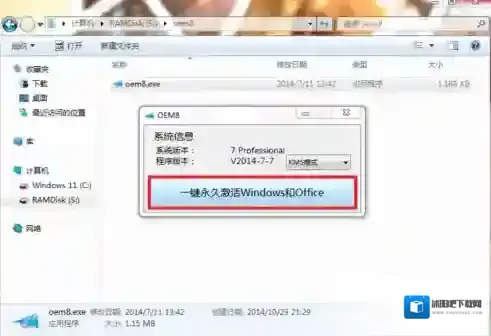
激活工具

数据执行保护

数据执行保护

2、根据激活模式,win8以后的系统不像win7那么容易激活了,貌似只能循环kms180激活,任何宣称永久激活的软件非kms180即伪激活,要真正免费、永久只能电话激活,这里不做介绍;

系统

系统

发表回复

登录后才能评论

评论列表 ( 0条)