
Warning: unserialize(): Error at offset 133 of 250 bytes in /www/wwwroot/comshuyang8/wp-content/themes/softsphere/functions.php on line 120

Warning: unserialize(): Error at offset 133 of 250 bytes in /www/wwwroot/comshuyang8/wp-content/themes/softsphere/functions.php on line 120
小马Win10激活工具最新版客户端-沭阳吧下载网
Warning: unserialize(): Error at offset 133 of 250 bytes in /www/wwwroot/comshuyang8/wp-content/themes/softsphere/functions.php on line 120
精品推荐

    Warning: unserialize(): Error at offset 133 of 408 bytes in /www/wwwroot/comshuyang8/wp-content/themes/softsphere/functions.php on line 120
  • win7仿win8主题win7仿win8主题

  • Warning: unserialize(): Error at offset 133 of 250 bytes in /www/wwwroot/comshuyang8/wp-content/themes/softsphere/functions.php on line 120
  • 系统之家一键重装大师系统之家一键重装大师

  • Warning: unserialize(): Error at offset 11 of 128 bytes in /www/wwwroot/comshuyang8/wp-content/themes/softsphere/functions.php on line 120
  • 定时关机3000定时关机3000
  • 海贼王动漫win7主题海贼王动漫win7主题

  • Warning: unserialize(): Error at offset 133 of 250 bytes in /www/wwwroot/comshuyang8/wp-content/themes/softsphere/functions.php on line 120
  • 暴风win10激活工具暴风win10激活工具
  • 玉历宝钞玉历宝钞

  • Warning: unserialize(): Error at offset 11 of 128 bytes in /www/wwwroot/comshuyang8/wp-content/themes/softsphere/functions.php on line 120
  • 小马win7小马win7

  • Warning: unserialize(): Error at offset 11 of 128 bytes in /www/wwwroot/comshuyang8/wp-content/themes/softsphere/functions.php on line 120
  • 时间还原与文件归理时间还原与文件归理

  • Warning: unserialize(): Error at offset 133 of 372 bytes in /www/wwwroot/comshuyang8/wp-content/themes/softsphere/functions.php on line 120
  • RunAsDateRunAsDate

  • Warning: unserialize(): Error at offset 11 of 128 bytes in /www/wwwroot/comshuyang8/wp-content/themes/softsphere/functions.php on line 120
  • 任务栏修复工具任务栏修复工具

  • Warning: unserialize(): Error at offset 133 of 250 bytes in /www/wwwroot/comshuyang8/wp-content/themes/softsphere/functions.php on line 120
  • vmlitevmlite

  • Warning: unserialize(): Error at offset 11 of 128 bytes in /www/wwwroot/comshuyang8/wp-content/themes/softsphere/functions.php on line 120
  • 局域网监控系统局域网监控系统

  • Warning: unserialize(): Error at offset 133 of 372 bytes in /www/wwwroot/comshuyang8/wp-content/themes/softsphere/functions.php on line 120
  • Everything(文件快速搜索)Everything(文件快速搜索)

  • Warning: unserialize(): Error at offset 133 of 372 bytes in /www/wwwroot/comshuyang8/wp-content/themes/softsphere/functions.php on line 120
  • 装机吧一键重装系统装机吧一键重装系统

  • Warning: unserialize(): Error at offset 133 of 250 bytes in /www/wwwroot/comshuyang8/wp-content/themes/softsphere/functions.php on line 120
  • 百度云盘搜索(资源搜索引擎)百度云盘搜索(资源搜索引擎)
  • xp激活工具xp激活工具

  • Warning: unserialize(): Error at offset 133 of 494 bytes in /www/wwwroot/comshuyang8/wp-content/themes/softsphere/functions.php on line 120
  • EasyUEFIEasyUEFI

  • Warning: unserialize(): Error at offset 133 of 494 bytes in /www/wwwroot/comshuyang8/wp-content/themes/softsphere/functions.php on line 120
  • 黑鲨装机大师黑鲨装机大师

小马Win10激活工具最新版

小马Win10激活工具最新版
  • 更新时间:
  • 软件分类: 系统软件
  • 软件版本: v2016.02.01
  • 软件大小: 881KB
  • 软件平台: Windows
  • 软件评分: 4分

小马Win10激活工具软件介绍

win10激活工具官方版一键解决win7/win8/win8.1/win10系统激活问题,实现永久完美离线激活,完全超越其他任何激活工具。能够精准识别电脑上安装的所有Office版本和Windows系统;不需要输入任何路径;不需要手动选择软件版本;不占用系统任何资源。支持版本:win10激活工具官方版支持所有32位/64位的Windows系统和Office2010/2013/2016办公软件。

小马Win10激活工具版本

小马Win10激活工具版本

小马win10永久激活工具 v20160116 更新内容:
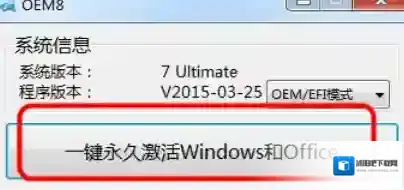
小马Win10激活工具永久激活

小马Win10激活工具永久激活

1、新增对Windows 10 Insider Preview Build 10576的支持。

2、新增对Windows 10 Insider Preview Build 10586的支持。

3、新增对Windows 10 Insider Preview Build 11082的支持。

4、新增对Windows 10 Insider Preview Build 11099的支持。

5、祛除冗余,优化程序,加快激活速度。

6、其他一些BUG的修复。

小马win10永久激活工具功能特点

小马win10激活工具界面简洁,无效复杂的操作,直接一键激活windows和office,成功率极高!还在为windows8 windows10激活发愁的朋友们,可以试试小马激活,值得下载珍藏!

软件特色

1、精准识别电脑上安装的所有Office版本和Windows系统;

2、不需要输入任何路径;

3、不需要手动选择软件版本;

4、不占用系统任何资源。

支持版本:支持所有32位/64位的Windows系统和Office2010/2013/2016办公软件

FAQ

问:在30天试用期过后激活,激活后第一次进入系统会提示没激活

解决方法:无需解决,系统此时已经处于激活状态了。右键点击计算机属性就能看到了。重启之后就会发现正常了,但黑色桌面背景需要手动修改。

问:少部分电脑激活后无法开机进入系统

解决方法:

(1)长按电源键进行硬关机,开机时狂按F5键,选择1,进入系统运行激活卸载即可。

(2)制作U盘 PE系统,开机选择U盘引导,进入PE系统后找到引导修复工具,尝试修复引导记录。

安装步骤

该软件无需安装,下载后打开.exe文件即可运行。

使用技巧

1、双击打开.exe文件

2、点击下面的按钮,激活win10

3、击一键永久激活后,Win7/Win8/Win10等系统就永久激活了。

发表回复

登录后才能评论

评论列表 ( 0条)


Warning: unserialize(): Error at offset 133 of 250 bytes in /www/wwwroot/comshuyang8/wp-content/themes/softsphere/functions.php on line 120